Easter Bunny Patchwork PNG Design: A Practical Guide for Quality Creations
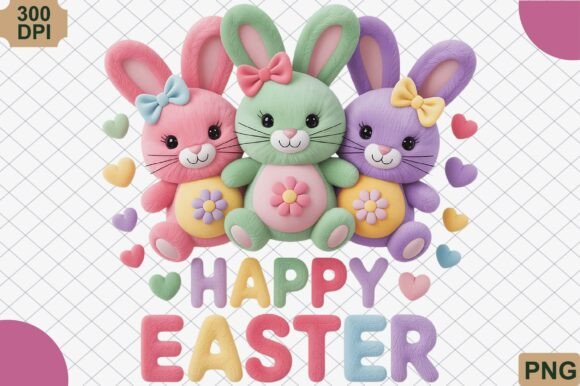
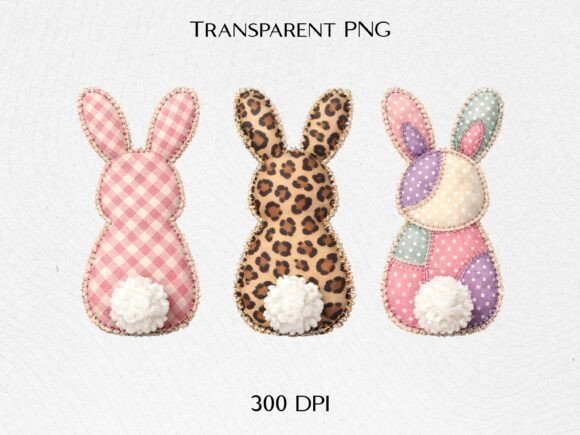
The Easter Bunny Patchwork PNG Design has become a staple for creators seeking that perfect blend of rustic charm and springtime nostalgia. This specific digital asset features three adorable bunny silhouettes rendered in a patchwork fabric style, incorporating gingham, leopard print, and pastel patterns to simulate an applique and embroidery look. For small business owners, hobbyists, and designers, this high-quality file offers a shortcut to achieving a cozy, handmade aesthetic without the hours of physical stitching. However, the transition from a digital screen to a physical product is where many projects falter. Understanding the technical nuances of this Easter Bunny Patchwork PNG Design is essential to avoid wasted materials and disappointing results in sublimation, t-shirt printing, and DIY crafts.
Understanding the Visual Texture and Print Expectations
One of the most common misunderstandings when working with faux-texture graphics like this Easter Bunny Patchwork PNG Design is assuming the printer will replicate the tactile feel of fabric. The design mimics the look of stitching and woven textiles through high-resolution shading and shadowing, but the final output remains flat ink. Beginners often expect the gingham or leopard print elements to have actual depth, leading to confusion when the printed result looks smooth.
To manage this expectation effectively, you must treat the file as a photographic representation of texture rather than a vector shape. When using this design for sublimation on polyester fabrics or direct-to-garment (DTG) printing on cotton, color management becomes critical. Pastel patterns can easily shift toward gray or neon if your printer profile is not calibrated correctly. Before committing to a full production run for Easter outfits or tote bags, always print a test swatch at 100% scale. This allows you to verify that the subtle shadows defining the "applique" edges are crisp and that the pastel tones remain soft and true to the digital preview. If the patchwork details appear muddy in your test print, adjusting the contrast slightly in your RIP software or design editor can restore the intended handmade definition.
Resolution and Sizing Pitfalls in Digital Downloads
While this Easter Bunny Patchwork PNG Design is provided as a high-resolution, 300 DPI file with a transparent background, resizing errors remain a frequent issue. A significant mistake occurs when creators stretch the image beyond its native pixel dimensions to fit larger items like adult-sized sweatshirts or large tote bags. Unlike vector files, PNGs have a fixed pixel count. Enlarging them digitally introduces interpolation, which blurs the intricate edges of the bunny silhouettes and softens the simulated fabric weave.
If your project requires a size larger than the original download, do not simply drag the corner handle in your design software. Instead, utilize AI upscaling tools specifically designed for raster art to increase resolution while preserving edge sharpness. Alternatively, use the design as a central focal point surrounded by complementary vector elements or text. This approach maintains the integrity of the patchwork detail while allowing you to fill a larger print area. For stickers and smaller accessories, ensure you are scaling down appropriately; reducing the size too aggressively can cause the fine lines of the embroidery simulation to disappear entirely during the cutting or printing process.
Color Management for Sublimation and Apparel
The inclusion of leopard print and gingham within the Easter Bunny Patchwork PNG Design presents unique challenges for color consistency across different substrates. Sublimation ink behaves differently than standard inkjet or laser toner. Colors often appear dull on paper before pressing but vibrant after heat transfer. Relying solely on how the file looks on your monitor is a recipe for mismatched Easter outfits.
Furthermore, the base color of your garment affects the outcome. Because this file utilizes a transparent background, it relies on the substrate to provide the "negative space." Printing these pastel bunnies on a dark navy shirt without a white underbase layer will result in invisible or severely altered colors. Even on white garments, the interplay between the leopard spots and pastel patches requires careful attention. Ensure your color profile matches your specific ink and paper combination. Many creators overlook the fact that "pastel" in RGB (screen mode) does not always translate directly to CMYK (print mode). Converting your workspace to CMYK before finalizing the layout can help identify potential color shifts early, ensuring the cozy aesthetic translates accurately to the physical product.
Licensing and Commercial Application Awareness
For entrepreneurs and small business owners, the instant download convenience of this Easter Bunny Patchwork PNG Design should never overshadow licensing verification. A practical error involves assuming that purchasing a digital file grants unlimited commercial rights for all applications. While this design is ideal for t-shirt designs and creative projects, specific terms may restrict mass production, resale of the digital file itself, or use in trademarked branding.
Before listing products derived from this design, review the license agreement thoroughly. Check for limitations on the number of units you can sell or whether attribution is required. Additionally, be cautious about combining this design with other copyrighted characters or trademarked phrases. The rustic, handmade style pairs beautifully with generic spring sentiments, but pairing it with protected intellectual property can lead to platform takedowns or legal issues. Keeping your accompanying text and graphics original ensures your business remains compliant while leveraging the trendy appeal of the patchwork aesthetic.
Optimizing File Preparation for Different Crafts
Versatility is a key selling point for this Easter Bunny Patchwork PNG Design, yet treating every craft medium identically leads to subpar results. The preparation required for a vinyl sticker differs vastly from that of a sublimated mug. For sticker making, the intricate edges of the patchwork bunnies can be difficult for cutting machines to track. Simplifying the cut line by adding a slight offset border prevents the blade from getting lost in the simulated texture details. This creates a clean, professional finish rather than a jagged edge that ruins the illusion of fabric.
Conversely, for sublimation and DTG, you want to preserve every pixel of that texture. Avoid applying heavy outlines or drop shadows in your design software unless necessary for visibility. The file already contains built-in shading to create depth; adding more can make the design look cluttered and artificial. When creating Easter outfits for children, consider the placement carefully. Center-chest placements are standard, but for toddler sizes, the three-bunny composition might need to be rearranged or scaled to fit the smaller printable area without losing the relationship between the silhouettes. Thoughtful adaptation ensures the design looks intentional and proportional on every item.
Evaluating Quality Before Purchase and Use
Finally, discerning creators should know what to inspect immediately upon downloading. Open the Easter Bunny Patchwork PNG Design in an image editor and zoom in to 100%. Check the transparency mask around the bunnies. High-quality files have clean, anti-aliased edges. Poor quality files often exhibit white halos or jagged pixels that become glaringly obvious on colored backgrounds. Verify the DPI metadata to confirm it truly meets the 300 DPI standard at the intended print size.
Taking these few minutes to validate the file saves hours of frustration later. Whether you are a seasoned professional expanding your spring catalog or a hobbyist making gifts for family, respecting the technical requirements of this design ensures the final product honors the cozy, handmade inspiration behind it. By avoiding common pitfalls regarding texture interpretation, resolution limits, color profiles, and licensing, you transform a simple digital download into a polished, market-ready creation that captures the true spirit of the season.